
ImagiNative 3D
The application requires that the GPU devices support OpenGL ES 2.0 and above.
The program is written in C++ using the Android NDK.
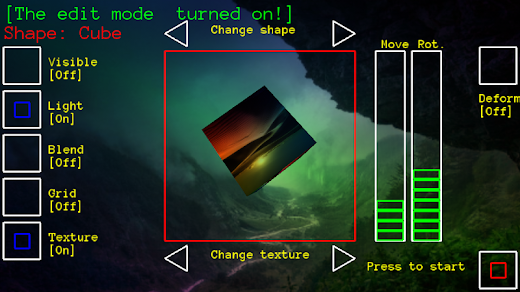
The Java call are implemented via the JNI interface With the help of this program you can create various fantastic scenes, changing the colors, lighting, textures,forms, shapes and 3D models .At program start appears on the scene a 3D model and shapes (pyramid, cube, 2 spheres) .
Figure and 3D model are in motion.
You can only manage active figure.
To activate the pieces you need to touch her.
The active figure or 3D model is controlled by scrolling horizontally and vertically, and also in the "control" of the corresponding buttons ("Visibility", "Aside","Right","Stop").
Also, there are buttons to go to edit mode (Edit) and help ("Help") .
If you want to use your own textures and models,download textures in PNG or JPG format in the directory of the SD card **ImagiNative3D/textures, and 3D models in OBJ format with one texture in the directory **ImagiNative3D/model**.Screen orientation can be either landscape or portrait.The user task in this program is to contemplate,to dream , to find the beauty,the harmony , to think as well as think people looking at the fire.
I position this application not only as a technical realization of the graphic capabilities of the device , but also as an idea , the art thumbnail, which is the philosophical sense of constant motion, cycles of light and dark, life and decay.
The application , of course, not technically perfect, but it can serve as a starting point for expressing your ideas for other developers.
This miniature inspired by the lessons of Ray Wenderlich OpenGL Tutorial for iOS: OpenGL ES 2.0 , for which I еxpress my special gratitude.
The background of the outside world is built from fragments of images that are loaded by the program "das Image".All comments and suggestions can be sent by email [email protected].
About ImagiNative 3D
- Package name (App ID)
- ask.droid.askTextue
- Available on
- Google Play
- Price
- Free
- Developer
- Anatoli Kazun
Looking for the ImagiNative 3D APK?
The safest way to get ImagiNative 3D (ask.droid.askTextue) on your Android device is to install it directly from Google Play — you'll always get the latest official version, automatic updates, and no risk of modified or infected APK files from third-party sites.

Camera Features
Advanced camera features with editing capabilities.
Weather Features
Get accurate weather forecasts and real-time updates.
Productivity Tools
Boost your productivity with powerful tools and features.
See ImagiNative 3D in Action


Frequently Asked Questions
Is ImagiNative 3D free?
Yes, ImagiNative 3D is free to download and install on Android through Google Play.
How do I install ImagiNative 3D on Android?
Open Google Play on your Android phone or tablet, search for ImagiNative 3D by Anatoli Kazun or tap the Google Play button on this page, then tap Install. The app downloads and installs automatically.
What is ask.droid.askTextue?
ask.droid.askTextue is the App ID (package name) of ImagiNative 3D on Google Play. Every Android app has a unique package name, and it is the safest way to verify you are installing the official app.
Is ImagiNative 3D safe to download?
Installing ImagiNative 3D from Google Play is the safest option: you get the official version published by Anatoli Kazun, verified by Google Play Protect, with automatic updates. Avoid APK files from unofficial third-party sites.

Get ImagiNative 3D Today
ImagiNative 3D for Android — free download on Google Play.
Compatible with Android phones and tablets — available on Google Play.
Ask AI about this app
Get instant answers about features, tips and more from popular AI assistants.